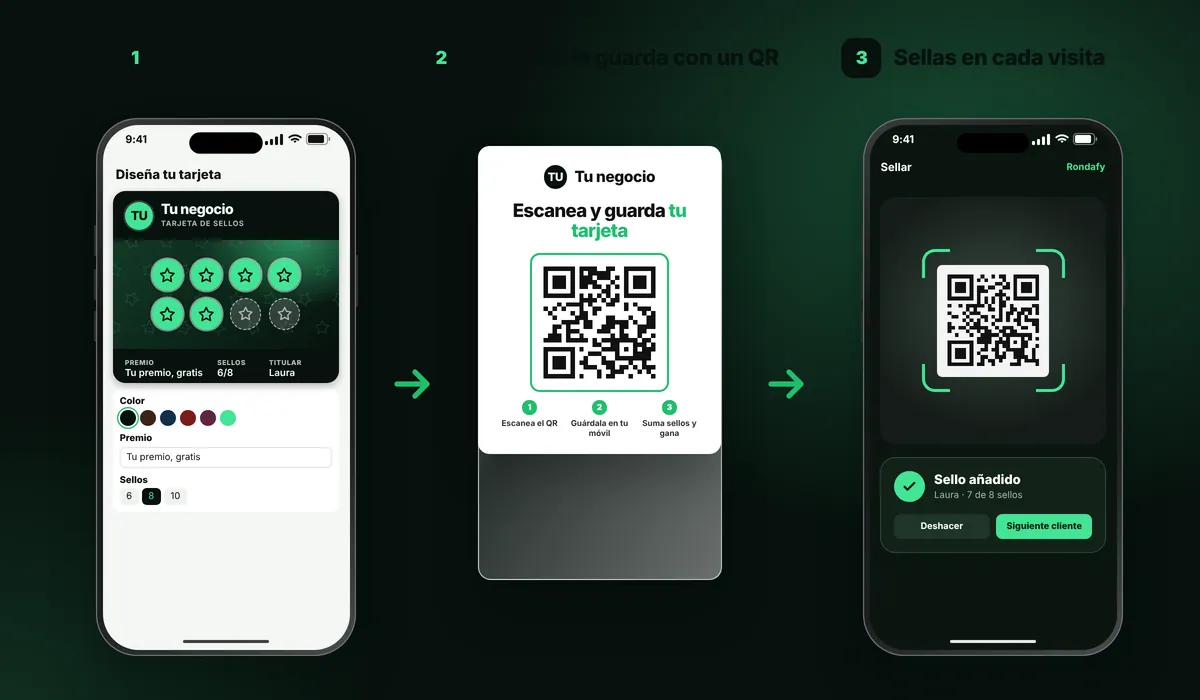
The customer doesn't install an app or fill in forms. They save their card, the business manages stamps and visits, and Rondafy turns that activity into useful information.
No app to download No name, email or phone required All from a single dashboard
Rondafy works in three moves: you design the card, your customer saves it on their phone by scanning a QR code and, on every visit, you scan their card to add a stamp. Everything is managed from one dashboard, and your customers never have to install an app.
In 1 minute
They scan, save it and come back
This is how your customer experiences it: they scan your venue's QR code, save the card on their phone and every visit brings them closer to their reward. You control everything from your dashboard.
✓
No apps, no paperThe card lives in Apple Wallet or Google Wallet.
✓
With your brandYour logo, your colours and your reward.
✓
So they come backStamps, notifications and rewards that give them a reason to return.
Create your account and design the card: logo, colours, reward and number of stamps. You can see how it looks in design your card.
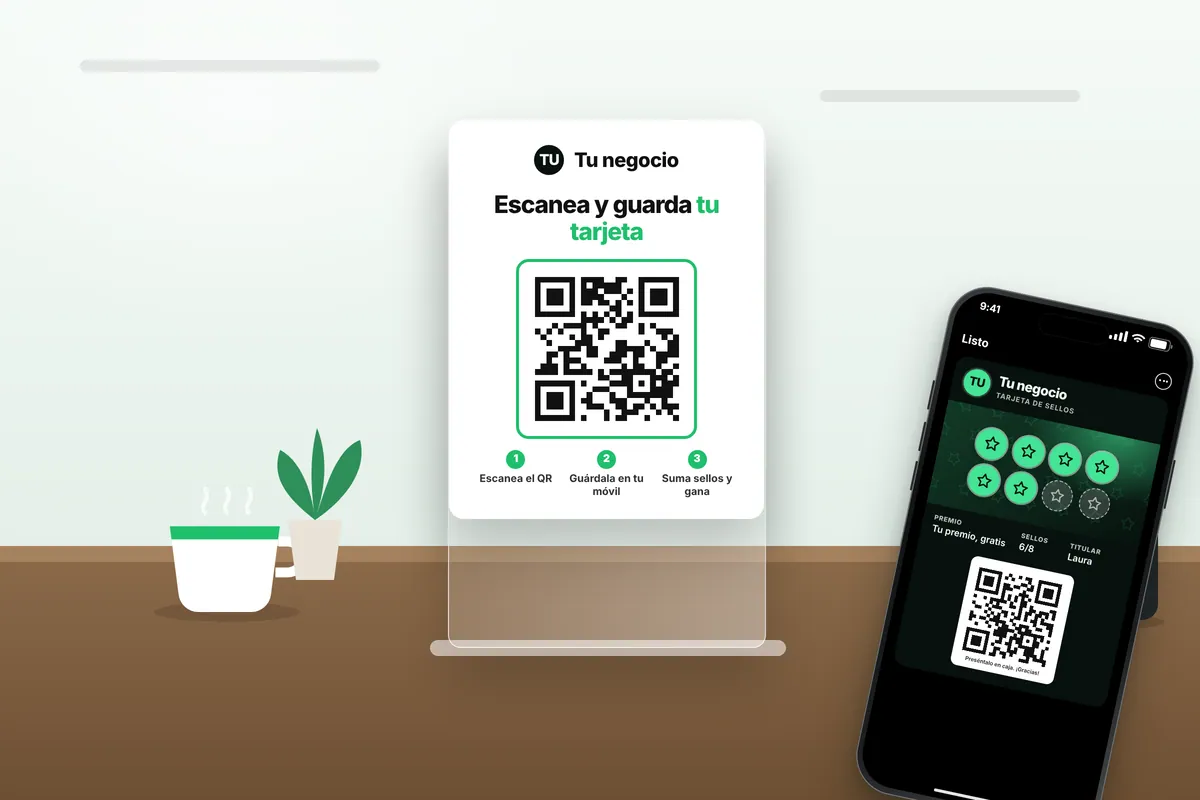
Print the QR code (Rondafy gives you a ready-made poster) and put it on your counter.
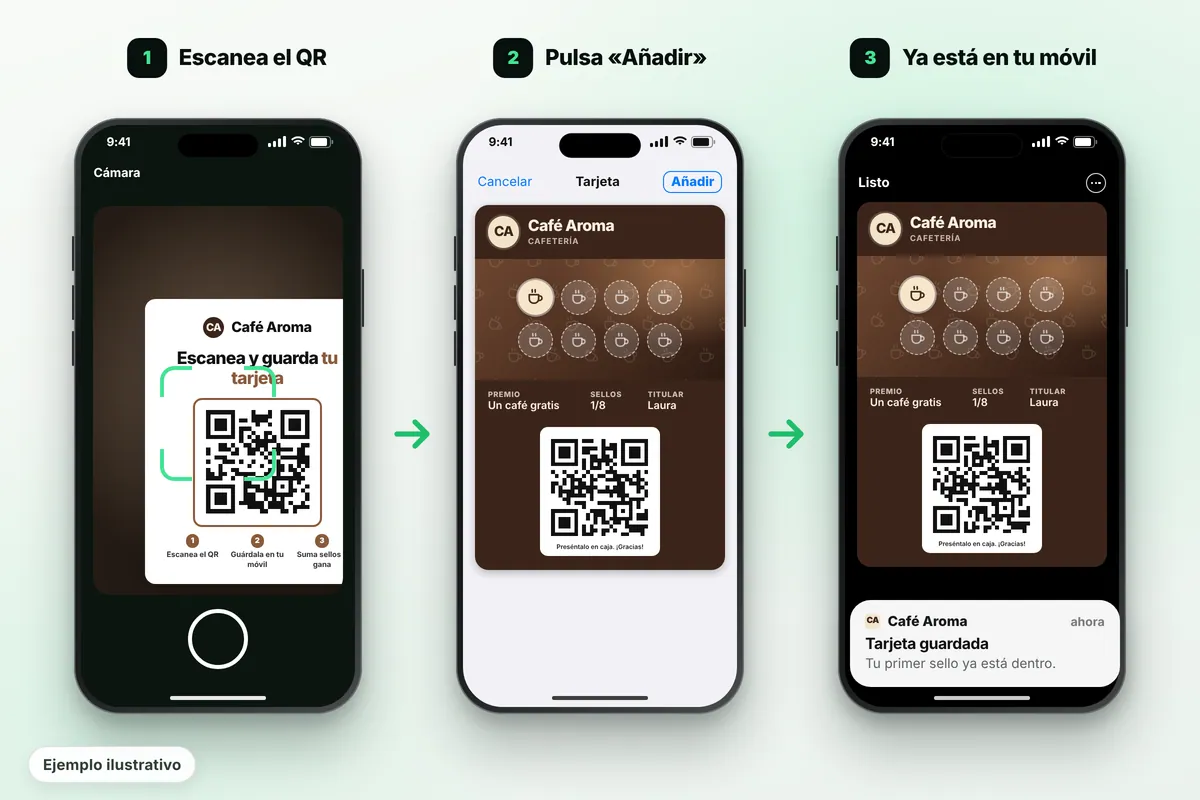
Your customers scan and save the card in Apple Wallet or Google Wallet in a few seconds.
Stamp on every visit by scanning the card with your phone, tablet or computer. You can give your team access too.
Redeem the reward when the customer fills the card, and the card starts again.
With Rondafy you can have your card ready the same day.
Loyalty card with a QR code: how your customer saves it
Rondafy uses two QR codes, and it's worth not mixing them up:
The counter QR code is the sign-up one. You put it on a poster and the customer scans it once with their phone camera to save their card. Rondafy gives you the poster ready to print.
The card QR code is the one shown on the customer's own card, inside their Wallet. You scan it on every visit to add a stamp or redeem the reward.
Illustrative example
For the customer it's three taps: scan the QR code with the camera, tap "Add" and the card is saved in Apple Wallet (iPhone) or Google Wallet (Android), with no app to download and no need to type their name, email or phone number. If they change phones, they scan the counter QR code again and get their card back with all their stamps, because they're stored in the system, not on a piece of paper.
If you'd like to see a card with a QR code before signing up for anything, you can design yours and save a test card on your phone. And if you're coming from a paper card, see how to switch from paper to digital.
HOW THE METRICS ARE GENERATED
Rondafy measures real interactions.
The statistics don't appear by magic. Rondafy records events when the customer interacts with the programme: for example, when their code is scanned, a stamp is added or a reward is redeemed. That way repeat-visit metrics can be built without asking for their name, email or phone.
!
An important distinctionIf someone walks into the venue and doesn't interact with Rondafy in any way, the system can't know they were there. That's why a "Rondafy visit" must be based on a scan or another recorded interaction.
#
Technical identifierEach card can be linked to an internal identifier to recognise the programme history without showing the business the customer's contact details.
What you can send your customers
"Just 1 stamp to go", birthdays, win-backs for customers who haven't been in for a while, manual messages and messages to groups of customers. Available on the Standard and Pro plans. The nearby alert depends on each customer's device and settings.
Quick answers to the most common questions before you launch your programme. Standard €24.99/month and Pro €39.99/month, excluding VAT. 14 days free, no commitment.
No. The flow is designed so they can get their card without entering their name, email or phone.
Staff identify the customer's card by scanning it as the system provides and confirm the corresponding action. The history is linked to that technical identifier.
The dashboard can work with internal identifiers and aggregated data. The idea is to understand how the programme behaves without needing to show names, emails or phone numbers.
Active customers, new cards, repeat visits, recorded visits, stamps, redemptions, frequency and segments such as "close to reward" or "inactive" — always based on the events that are actually recorded.
The sign-up QR code, on the poster Rondafy gives you. The customer scans it once with their phone camera to save their card. The QR code on the card itself is different: you scan that one to add stamps.
You can have it designed and the QR code ready the same day.
No. You stamp with the phone, tablet or computer you already use, with an internet connection.
They save the card again by scanning the QR code; their stamps are stored in the system.
The Standard plan costs €24.99/month + VAT and Pro €39.99/month + VAT, with a 14-day free trial and no commitment.