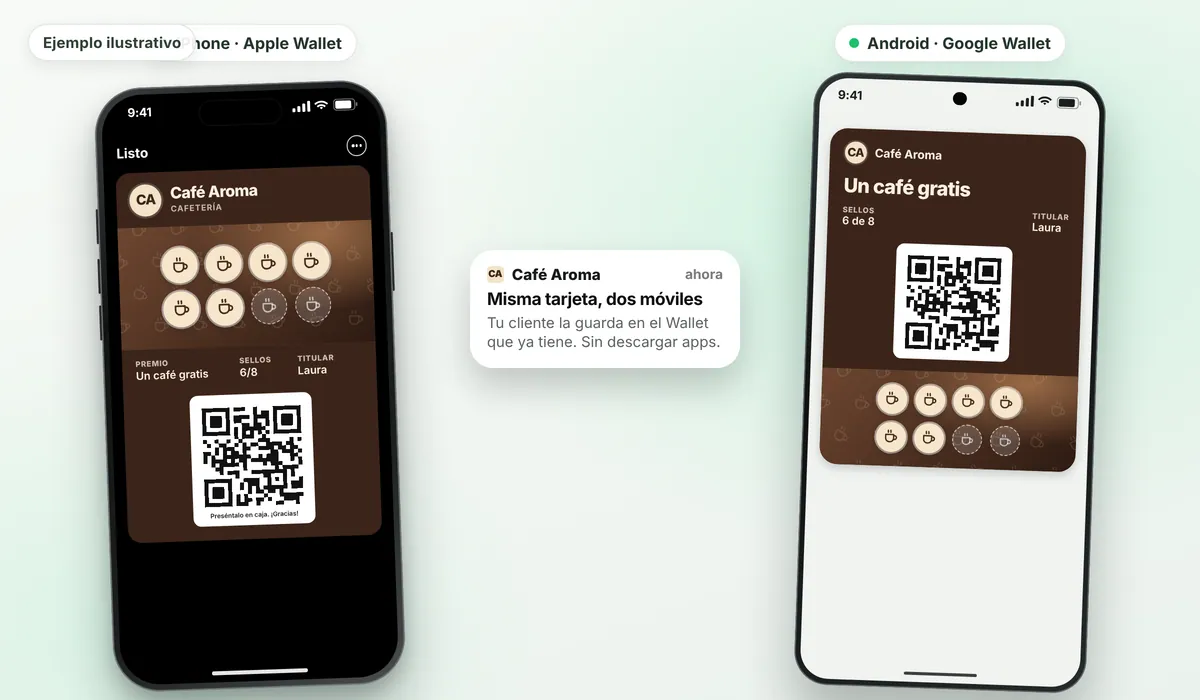
A loyalty card in Apple Wallet and Google Wallet is a stamp, points, gift or prepaid pass card that your customer keeps in their phone's wallet, alongside their tickets and bank cards. They don't have to download any app: they scan a QR code and the card is saved. Rondafy handles the technical side so all you do is design the card and stamp it.
What Apple Wallet and Google Wallet are
They're the digital wallets on phones. Apple Wallet comes as standard on iPhone and Google Wallet on Android phones. As well as payment cards, they store tickets, boarding passes and store loyalty cards.
For a local business this is a big advantage: you don't have to convince anyone to install an app to get their card. They just add it to the wallet they already have.
How your customer adds it
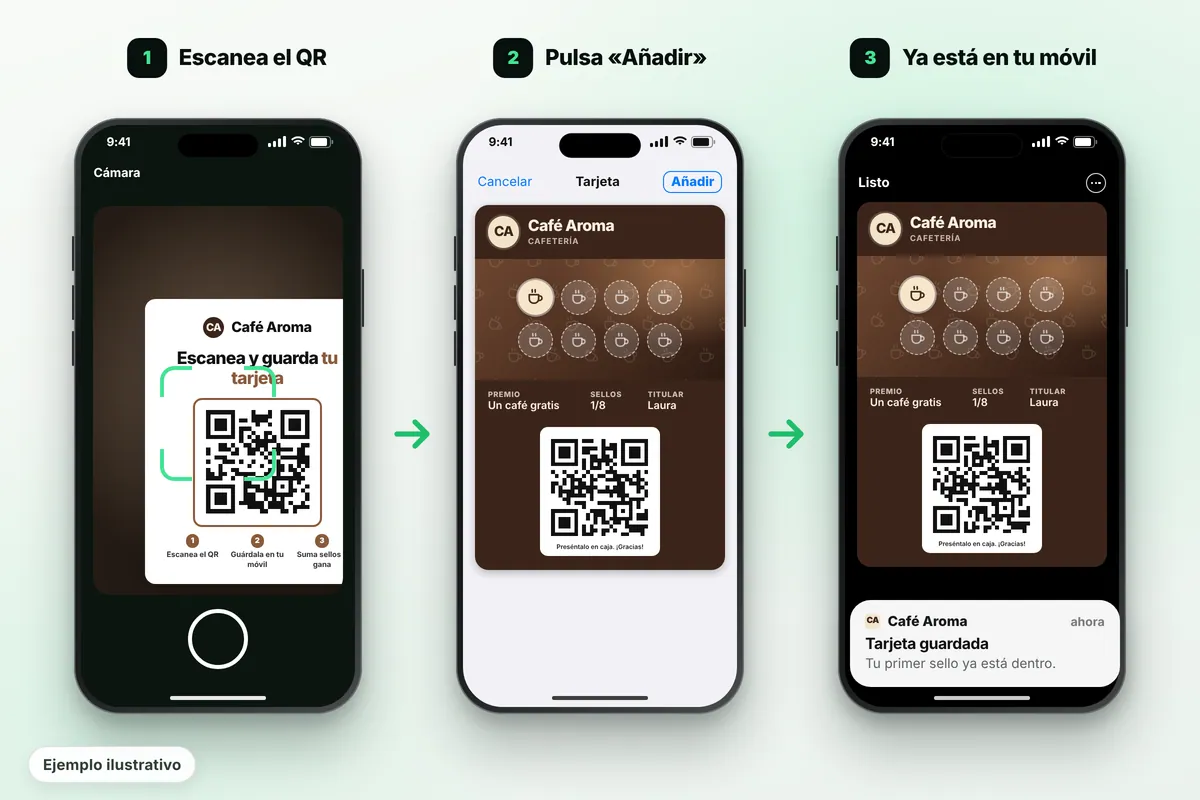
- They scan the QR code on your counter with their camera.
- A page with your branding opens, with a button to save the card.
- They tap «Add to Apple Wallet» or «Add to Google Wallet» depending on their phone.
- The card is saved. To use it, they show it when paying.
The whole process takes a few seconds and doesn't require creating an account or remembering passwords.
Why a Wallet card and not your own app
Hardly anyone wants an app for every café, barbershop or bakery. Your own app has to be downloaded, updated and maintained, and it's costly to build. A Wallet card is already on the phone: the customer saves it in seconds and finds it next to what they use every day.
Plus, your customer doesn't have to create an account or remember a password. If they change phones, they save it again from the QR code. And if you use paper cards today, see how to switch from a paper card to a digital one.
What they see on iPhone and on Android
| iPhone (Apple Wallet) | Android (Google Wallet) | |
|---|---|---|
| Where it's stored | Wallet app, next to their cards | Google Wallet app |
| Stamps | Update automatically when stamped | Update automatically when stamped |
| Phone notifications* | Messages on the lock screen | Card messages and notifications |
| Nearby notification* | Yes, when the customer is near the venue | Yes, but Google Wallet shows its own text |
| Your brand | Logo, colours and background photo* | Logo, colours and background photo* |
* Notifications, the nearby notification, free colours and the background photo are included in the Standard and Pro plans. Google limits how many notifications a card can show per day, so it's best to use them wisely.
On iPhone the card is saved in Apple Wallet, with your logo, your colours and the stamps collected so far. If the customer allows it, they get notifications on the lock screen. On Android it's saved in Google Wallet with the same design.
Google limits the number of daily notifications, so it's best to send them only when it matters. The nearby alert depends on each customer's device and settings: treat it as an extra, not the foundation of your programme.
Notifications that reach the lock screen
The big difference from a paper card is that the card in the phone's wallet can show messages. With Rondafy (Standard and Pro plans) you can:
- Send a notification to all your customers or a group: a new dish, opening hours, double stamps.
- Automatically wish your customers a happy birthday.
- Remind those who completed their card that their reward is waiting (after 3 days if they haven't come in).
- Message those who haven't been back for 14 days with the text you choose.
- Ask for a Google review right after the customer redeems their reward.
What you need to offer it
A phone, tablet or computer with internet to stamp, a printed QR code on the counter and your logo. That's it: no special POS or scanner needed. Rondafy generates the card, the QR sign-up and the dashboard where you stamp and see your customers. You can try how it would look in design your card.
Do I need to code or be an Apple developer?
Not with Rondafy. You just design your card from the dashboard and choose the reward.
Creating Apple Wallet and Google Wallet passes on your own requires developer certificates, a server to update the cards and technical maintenance. Rondafy takes care of all that: you design the card from the dashboard and your customers save it.
If you'd like to know how it works overall, see how Rondafy works, step by step.
Types of card you can save in Wallet
- Stamp card: one purchase, one stamp, one reward.
- Points card: rewards spend.
- Prepaid pass card: session packs (Pro plan).
- Gift card: store credit for your shop.
If you're just starting and don't know which suits you, there's the customer loyalty programme guide.